
Getting Started
Brand new? Getting involved in the TVG community is easy!
Quickstart Guide
- Create an Account: Sign up on our website using your email, Google, or Discord!
- Set Up Your Profile: This helps you find gamers with similar interests:
- Link your Discord: Connecting your accounts allows messaging integration between the website and our chat channels for notifications and crossposting.
- If you aren't on TVG Discord, click to join!
- Tell us about yourself! Add a brief bio, and fill out the player description tags using the drop-downs.
- Select anything you want, or type in your own details. Other players use this to find friends and players, and can see this on the Members page or on group invites.
- Set your preferences: Set your viewing preference (Dark or light mode), and set your privacy preferences. If you are going to use Looking for Group, you must add a way for people to contact you. We recommend Discord at minimum, but all of these options allow you to connect to other players.
- Discord messaging will allow users to message you directly through Discord.
- Email messaging will allow them to send you an email via TVG's email system. They will not see your email, but will get a message they can respond to through the website.
- Your game information only displays on your profile and the games if you allow it. That helps.
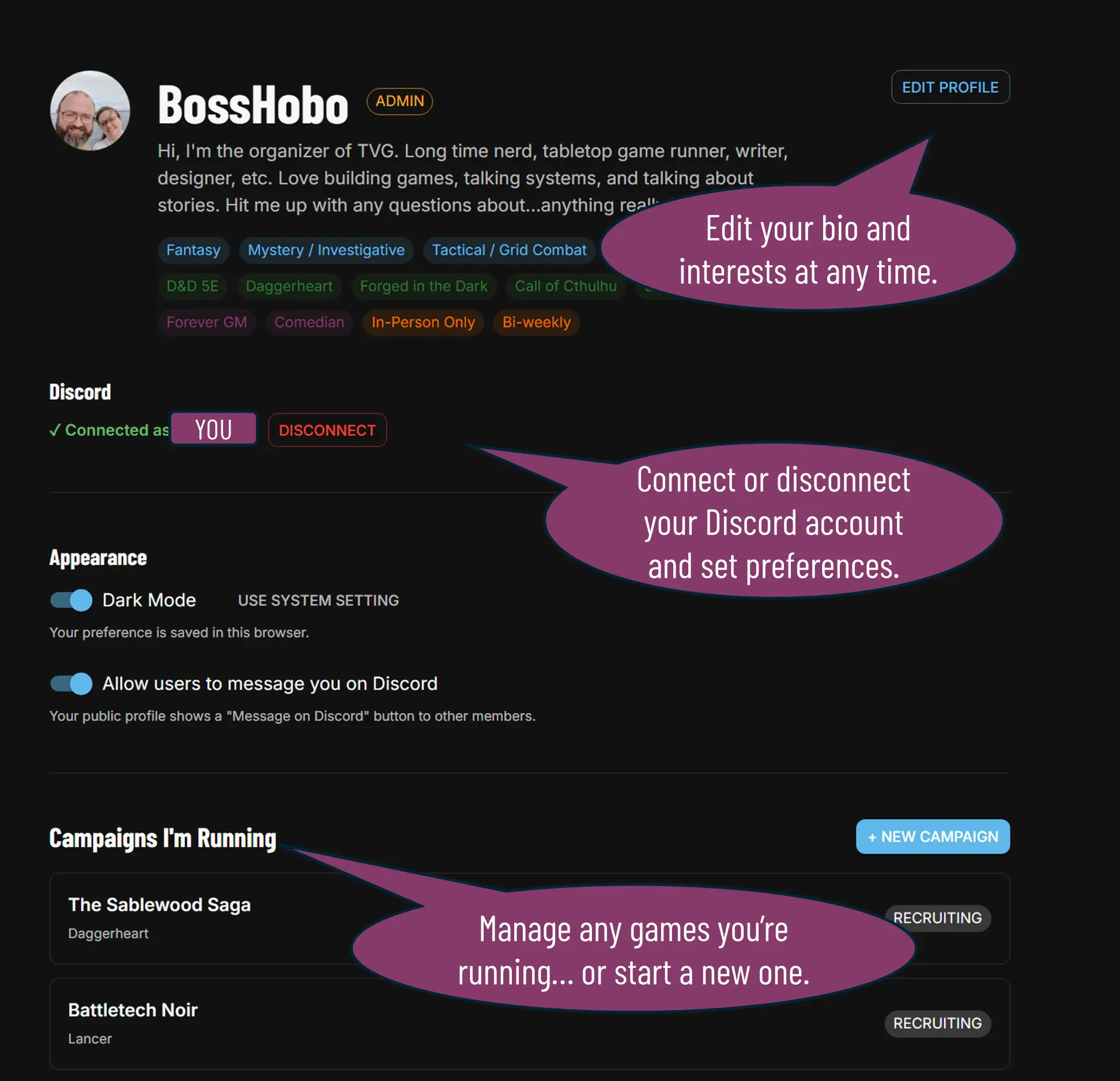
- Link your Discord: Connecting your accounts allows messaging integration between the website and our chat channels for notifications and crossposting.
- Check Out Our Events: Take a look at our public events or community calendar. These events are open to everyone, and new player friendly. Attending a group event is the best way to make friends and try out different games!
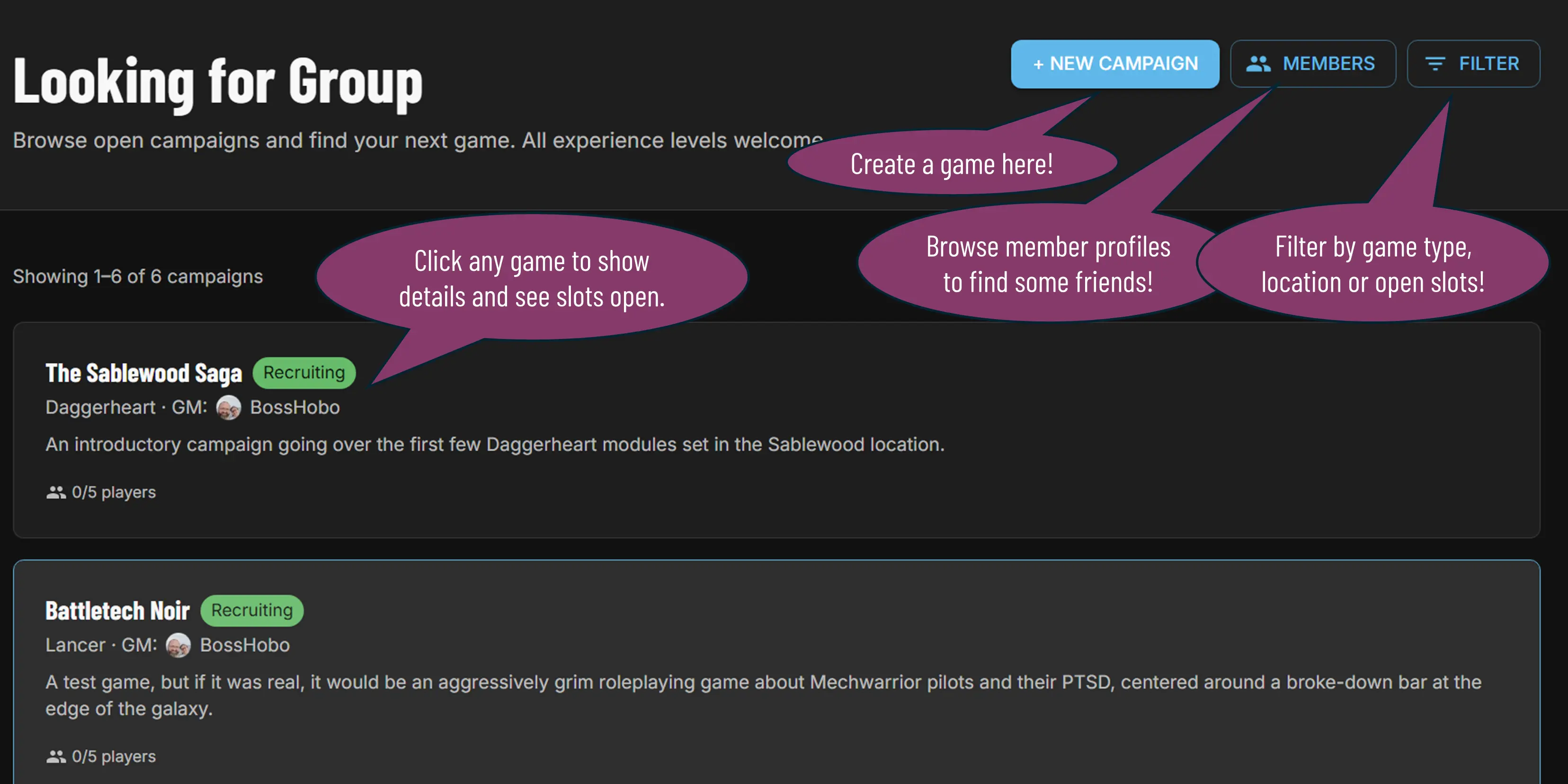
- Look for Games (or Host Your Own!): If you want to look for a private, recurring game, check out our Looking for Group pages:
- Check out our guides for how to be a great:
- Player who is popular at tables!
- Gamemaster who runs a creative and exciting game!
- Organizer who builds exciting events for the community!

TVG will not share your name, sign-up email, or Discord connection information with anyone; however, your username and bio will be viewable by any other members. If you flag yourself as able to be messaged, people can also message you on Discord using Discord's messaging interface.
Events Guide
Events are public gatherings for our community members. These might be one-off game nights to try a game, social events to make new friends and meet players, or they might be regularly occurring events like our Friday night Quickshots or OSR nights.
To find the event you want, click:
- Filter to see only a certain type of Event (like Social Events)
- View all Events to see the titles of all the current and past events.
- Event Calendar to see a Google Calendar of upcoming events.
Event Calendar
The Event calendar includes our upcoming group events, as well as curated TTRPG events from local game stores that share their calendar with us. These events are displayed on both Google and Discord. You can add this to your calendar directly with the Add to Google Calendar button.
We specifically do not display the many, many collectible card game events that happen in the valley. If you're looking for TCGs, check individual store pages for those kinds of events.
- Boise
- Meridian
- Nampa
Looking For Group
To find private games, check out the LFG. This has all of the games our members have created. You can use this to find games looking for more players! You can also look at other Member profiles! For tips on creating a campaign, check out our Gamemaster guide!
Safety Tip: Anyone can create a private game. We highly recommend you meet people in a public place before you go to a game at their house, to get to know them and determine if they're a good fit for you. Use your common sense and stay safe. You can also always message us if you feel somebody is not acting with integrity or abusing the platform.
Members
The Members page allows logged-in users to check out profiles of other members, to see what their interests are and what games they are running. Discord-connected members have the option of messaging each other using Discord's system.
Safety Tip: Remember to follow our Community Guidelines when messaging other members, and to get in touch with the organizers if needed.
Questions?
If you get stuck or have any questions along the way, don't hesitate to reach out through the contact options or the anonymous feedback form on our About page. We are always happy to help!